Extension Dialing
We love options! Use 2, 3, 4, or more digit extension dialing.
3-Way Conferencing
Conference any 3rd party for a 3-way call immediately after making or receiving a call.
Call Rejection
Anonymously reject unwanted callers right away, and they never have to know. Or block a designated number, especially those pesky vehicle warranty callers.
Attended Transfer
Transfer a call to an extension, group, or phone number after announcing the party to be transferred.
Call Monitoring
Designated users can monitor and interrupt ongoing calls. For instance, they have the option to Listen, Whisper, & Barge.
Auto-Attendant
Predefined options present to your caller. As an example, “Thank you for calling X. For sales, press one, and billing, press 2.”
Automatic Call Distribution (ACD)
ACD is a software system that answers incoming calls and then routes them to a specific agent or department within a company—routing based on time availability, behavior, and priority level.
Busy Lamp Field (BLF)
Indicates which phones are in use with a status on your display.
Call Flip
Transfer calls from one device to another quickly and effortlessly without interrupting your call.
Call Forwarding
Forward your phone number from either the portal or your device. And you may forward calls to any extension or phone number.
Call Hold
Place calls on hold, and your callers can hear music-on-hold or a custom commercial.
Call Indicator
Indicates incoming calls with available caller ID information while another call is in process.
Call Park
First, place a call into a fictional extension. Then pick up that call by dialing the parked extension number.
Call Queue
Route calls to a designated extension or group in a first-in-first-out manner. For example, callers generally hear something like, “Thank you for calling. All agents are busy. You are the Nth caller. Please hold for the next available agent or press N to leave a message.” When the call is ready to be routed, the ACD immediatetly handles the routing automatically.
Call Recording
Record calls for training or documentation purposes. Call recording is available with specific Paramount packages.
Call Routing based on business hours, after hours, & holiday schedule
Easily configured call routing based on business hours, after hours, and your holiday schedule, for example, departments with different hours of operation.
Call Return
Dial *69 to connect to the number that called you last.
Caller ID
You can customize the appearance of your outgoing Caller ID by number or extension.
Calling Line ID Delivery Blocking
Dial *67 to block your outgoing Caller ID on any selected outbound call.
Conferencing Bridge
Multiple on-site and outside callers can simultaneously participate in a password-protected conference call. Callers can be assigned talk-listen or listen-only access.
Integrations
Connect CRM with your phone system and exchange data between platforms.
Customer Portal
Paramount’s Customer Portal is intuitive. So it’s effortless for you to make changes to your account, view call detail records and billing information, listen to and delete voicemails, and upload music-on-hold.
Directed Call Pick-Up
Answer a call from another extension. For example, if you’re not at your desk, hear a phone ring and wonder if it’s yours, dial the pick-up number and your extension. The call will transfer if it was to the number you entered.
Direct Inward Dialing (DID)
Set-up a phone number to dial directly to a specific device or extension.
Do-Not-Disturb
Send your calls directly to voicemail.
Find Me Digital Assistant
Set up a personal assistant to “find you” at up to 5 locations. This feature is configured per extension and offers multiple call routing options. For example, callers first announce who they are and then select locations to try next. Or they can leave a message.
FREE Calls to other Paramount Communication Subscribers
All calls “On-Net” are FREE. That means you won’t get billed for any calls to another user on your Paramount service or other Paramount clients.
Group Call Pick-Up
Allows you to answer a call from any ringing phone that is in the same group as you. If there is more than one phone ringing, you would have no control over which call you to answer.
Hot Desking
These days cubicles and offices may have multiple owners that occupy them at different times. Hot-desking is the process in which office workers do not have any assigned seating. Instead, they may “check-in” to an open seat.
Incoming Call Blocking
Block phone numbers to block them from calling your voice system.
Incoming Call Identification
Identify an incoming call on the phone’s LCD by adding a custom prefix (ex: Sales, Support…)
Incoming Caller ID Routing
Route calls from a specified phone number to an auto attendant, extension, group, phone number, or call queue.
Instant Group Call
Designate a list of phone numbers that the system will automatically dial and added to an instant conference call every time a user calls the associated telephone number.
Message Waiting Indicator
LED notification, so you know there is a voicemail message left for you.
Mobile Twinning
Ring your cell at the same time as your extension.
Office Intercom
Dial another user’s extension, activating their speaker to make an announcement.
One Button Redial
Redial the last number dialed.
Outgoing Call Blocking
Prevent calls to specific numbers or services (ex: 900 numbers)
Paging
Make one-way announcements over IP phones and overhead paging devices.
Ring Groups
Enable multiple extensions to join a group. Then calls may be routed sequentially or simultaneously to that group.
Shared Call Appearance
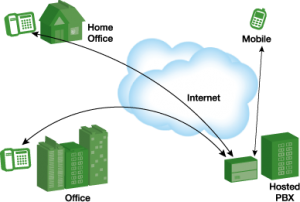
Shared Call Appearance is currently a necessity. Assign more than one device to your user account so you can make and receive calls from, for example, a phone at your office, another phone at your house, or your smartphone.
SMS & MMS
Send and receive text and multimedia messages from your business phone number to maintain your business identity.
Sub-Level Auto-Attendants
Sub-level Auto Attendants are often used, for example, by departments within an organization. For instance, you may have a main Auto -Attendant for the company, then a Sub-Level Auto Attendant for sales, support, etc.
Toll-Free Numbers
Utilize one or multiple Toll-Free Numbers. Route your Toll-Free Number to a specific local number, auto-attendant, group, or queue.
Always On Auto-Attendant
Allow callers to select from menu options using a standard telephone keypad. A portal interface routes callers to extensions, mailboxes, groups, outside numbers, conference rooms, queues, or unlimited additional Auto-Attendants.
Time-Based Auto-Attendant
Available after “N” rings or based on time-of-day routing.
Unattended Transfer
Transfer a call to another extension, group, or phone number WITHOUT announcing the transferred party.
Voicemail
Associate a voicemail box with an extension. Or use announce-only voicemail boxes which play a pre-recorded message.
Voicemail-to-Email
When you receive a voicemail, Paramount will e-mail you the voice message in a WAV file as specified per mailbox.
Voicemail-to-Text
The system can send a text message to your device to notify you when you get a voicemail.